
Reviewed · TRAVEL ESSENTIALS (SIM & PASSES)
South Korea: Unlimited Data and Voice eSIM
Phone data in Korea is easier than you think.
This South Korea unlimited 4G LTE eSIM is built for fast, worry-free connection once you land, and I like that it supports hotspot sharing plus uses SK Telecom for the network. The second win: you can also add voice calls and SMS later through online passport verification, which is handy when you need a Korean number. One thing to keep in mind is that the voice/SMS part is not instant—you’ll need the verification window to be done correctly, and if your phone isn’t eSIM-ready, it can turn into a headache.
For most trips, the setup is straightforward: you activate with the right eSIM QR after arrival, and you get unlimited data without speed throttling. The only real drawback I’d flag is logistics: the QR code in your GetYourGuide voucher is not the eSIM QR, and if you miss that detail (or your phone settings hide the new eSIM), you’ll be troubleshooting instead of exploring.
In This Review
- Key Highlights to Know Before You Buy
- How This Unlimited Korea eSIM Actually Works (Data First, Voice Later)
- Before You Land: EID Check and Getting the Right QR Code
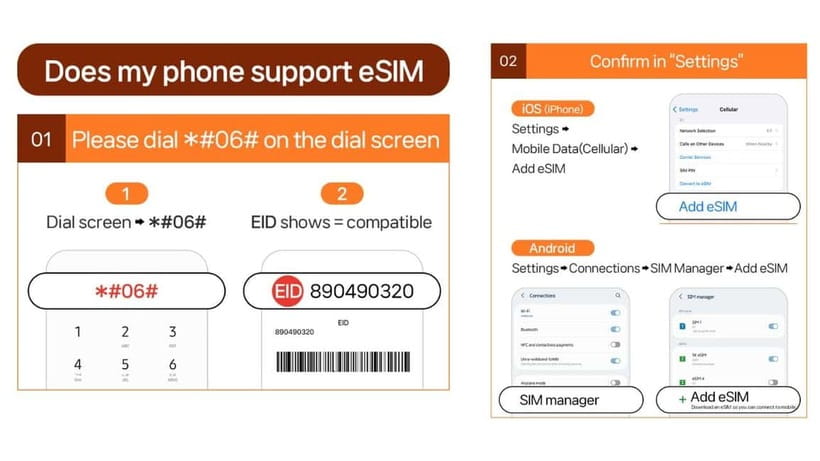
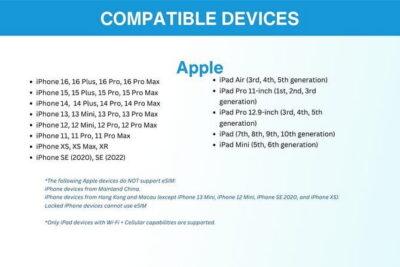
- Confirm your phone supports eSIM
- Know that the voucher QR is not the eSIM QR
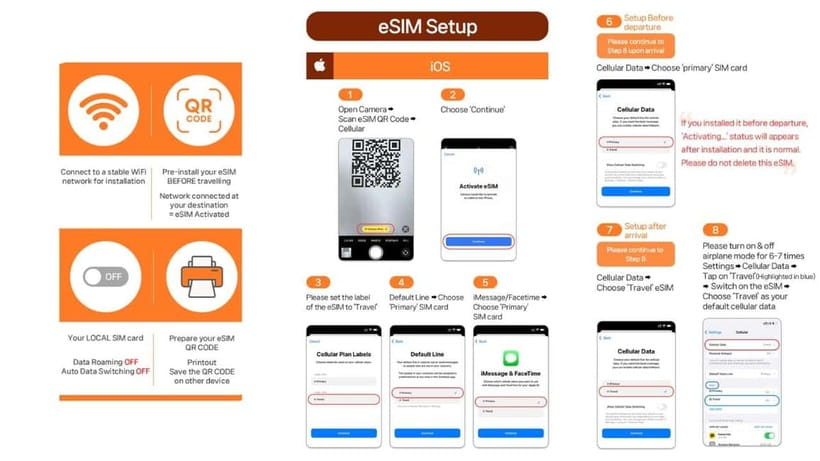
- On Arrival: Installing the eSIM and Getting Data Connected
- What I take from real user experience
- Unlimited Data in Practice: What You Can Expect Day One
- Voice Calls and SMS: When the Korean Number Actually Gets Activated
- Voice & SMS start after online verification
- Incoming calls and texts are included; outgoing is not
- Voice credits are complimentary
- One number per passport
- The Passport Verification Process: What You Need and How to Avoid Mistakes
- If Your Phone Says No: Compatibility and Unlocked-Phone Requirements
- eSIM must be supported
- Your phone must be unlocked for a foreign SIM/eSIM
- Troubleshooting Fast: What to Do When Setup Feels Broken
- Value for $8: What You’re Really Paying For
- Who This eSIM Suits Best
- Quick Checklist Before You Trust It
- Should You Book This Unlimited Korea eSIM?
- FAQ
- How soon will I have data after arriving in South Korea?
- Is the QR code in my voucher the correct one for the eSIM?
- What if I see an error like QR code is invalid?
- Can I use voice calls and SMS immediately?
- Does the plan include outgoing calls and outgoing SMS?
- Does the eSIM support hotspot sharing?
- What devices and passport types are eligible?
Key Highlights to Know Before You Buy
- Unlimited 4G LTE data in Korea with no speed throttling included
- SK Telecom as the carrier, plus hotspot sharing support
- Voice & SMS available after passport-based online verification
- eSIM arrives by email separately, not inside the voucher QR
- Validity options from 3 to 90 days, with activation tied to the local time window
Sort the practical stuff: more SIMs and city passes
- South Korea: Unlimited Data and Voice eSIM★ 4.6 · 156 reviews
- Gimpo Airport: Traveler SIM and T-money Transportation Card★ 4.9 · 33 reviews
- South Korea eSIM (3-30 days. Up to 45GB)★ 5.0 · 5 reviews
How This Unlimited Korea eSIM Actually Works (Data First, Voice Later)
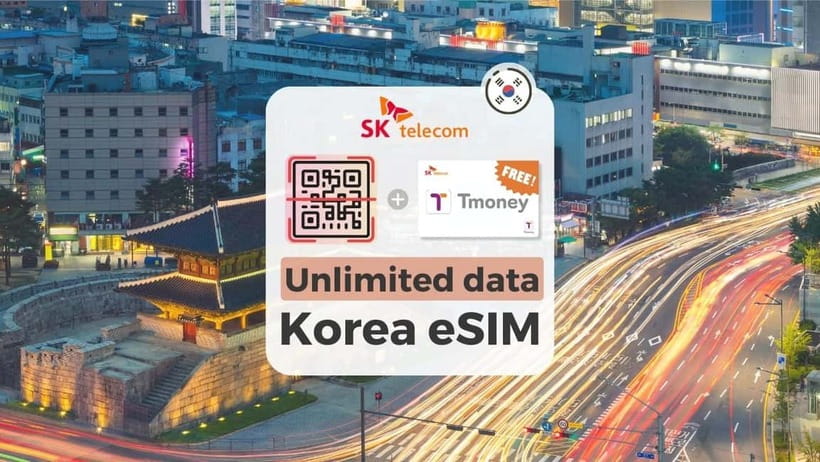
This is a short-term tourist eSIM product designed to get you online fast in South Korea. The main promise is clear: unlimited 4G LTE data that doesn’t slow down due to usage. In practical terms, that means maps, messaging apps, ride-hailing, and translation are covered without counting megabytes.
The second layer is voice and SMS. This is important because it changes how you should plan your first hours in Korea. Data can work earlier, but voice and text features require online verification with your passport. The product is built so you don’t have to wait for everything to become active at once—just know that the call/text features have a process and a timing window.
One more operational detail that matters in real life: the eSIM “starts instantly” when connected to SKT’s network, and the plan ends on a time schedule based on activation hours. That means you don’t want to treat this like a vague “calendar day” ticket. If you choose the 3-day or 7-day option, your best bet is to activate soon after you land so you actually use the full validity.
Before You Land: EID Check and Getting the Right QR Code
The biggest cause of stress with eSIMs is simple: the wrong device, the wrong QR code, or not enough setup time before you need data.
Confirm your phone supports eSIM
You’re told to check for compatibility by dialing #06# and looking for EID. If you don’t see EID, the phone is incompatible for this eSIM. Don’t skip this step. In Korea, you’ll be surrounded by Wi‑Fi, but maps without a connection still means extra friction.



Know that the voucher QR is not the eSIM QR
A very specific warning is included: the QR code in your voucher is not the eSIM QR code. The actual eSIM QR is delivered to your email about a day before your activity date. If you assume the voucher QR is enough, you can end up stuck with an “invalid QR code” error while you’re standing in airport chaos.
This matters because eSIM setup is fast only when the right code is on the right screen. Make sure you can find the email and that you can open it on the same phone you plan to install.
On Arrival: Installing the eSIM and Getting Data Connected
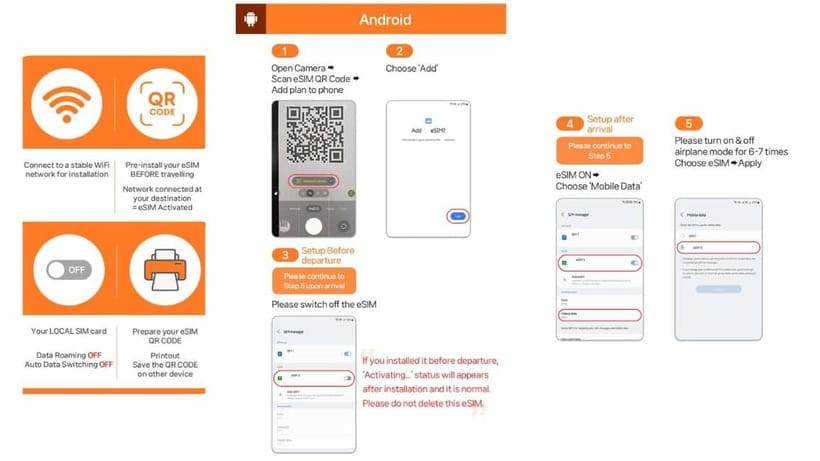
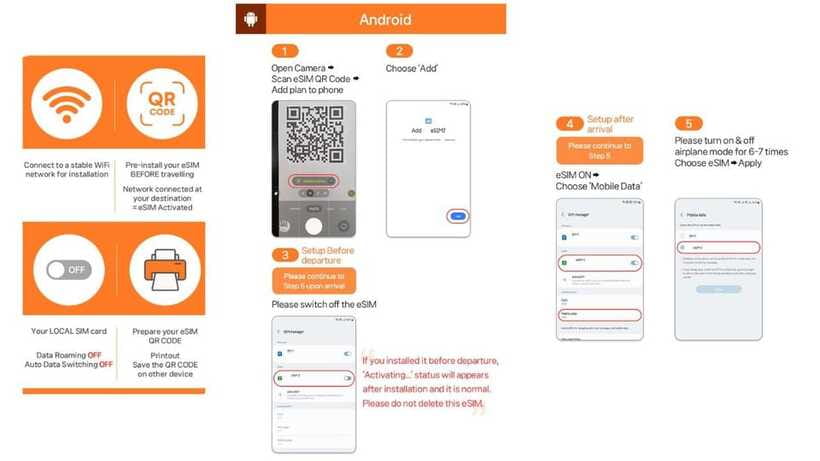
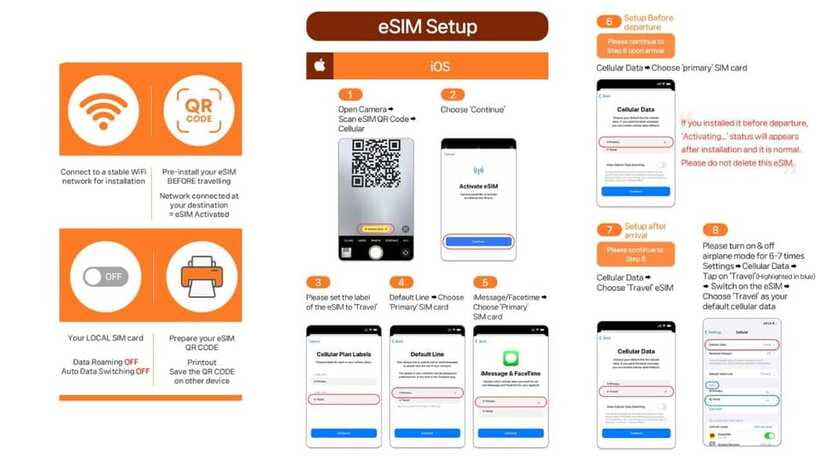
Once you arrive in Korea, the eSIM connects after you install it and your phone sees the local network. The product guidance is very direct: activation happens based on hours when connected to SKT’s network.
Here’s what you should do in a calm, logical order:
- Install the eSIM using the eSIM QR code delivered separately by email.
- After installation, check that the eSIM appears in your mobile network settings.
- If you get an error like QR code is invalid, follow the suggested troubleshooting path:
- iPhone: Settings > Cellular
- Android: Settings > Connections > SIM Manager
Look for a newly added eSIM entry.
I like that the troubleshooting instructions are spelled out for both iOS and Android. That saves time if your first attempt fails.
What I take from real user experience
One person described the installation process as taking about an hour, with additional adjustments needed after they asked for confirmation. Another mentioned the setup as easy and the network as stable. The pattern I’d draw from that is simple: the product can work quickly, but your phone settings and your familiarity with eSIM installation matter a lot. If you’re even slightly unsure, install the eSIM soon after landing when you’re not trying to hit a tight schedule.
Unlimited Data in Practice: What You Can Expect Day One
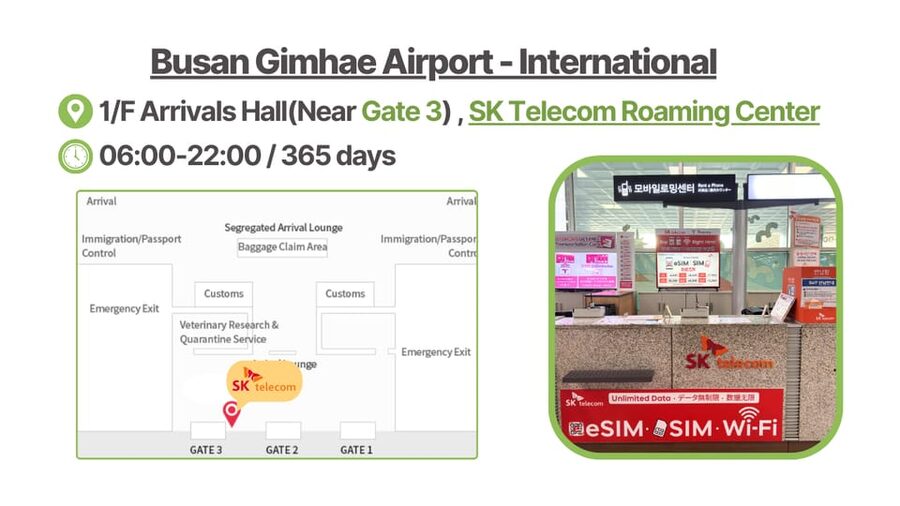
The data side is the main reason to buy this. The spec says unlimited data without speed throttling, so you shouldn’t face the typical “fair use” slowdown curve.
For your day-to-day travel use, that usually translates into:
- Map navigation without rationing
- Messaging and sharing photos
- Translation and quick searches
- Ride-hailing and transit lookup
Also, hotspot sharing is supported. That’s a big deal if you’re traveling with a friend or you need your laptop connected. Even if you don’t plan to tether, it’s a “peace of mind” feature.
Carrier note: it uses SK Telecom, a major network. You won’t always get maximum speed everywhere, but SKT coverage is typically a solid bet for urban areas and the route-heavy parts of a Korea trip.
Voice Calls and SMS: When the Korean Number Actually Gets Activated
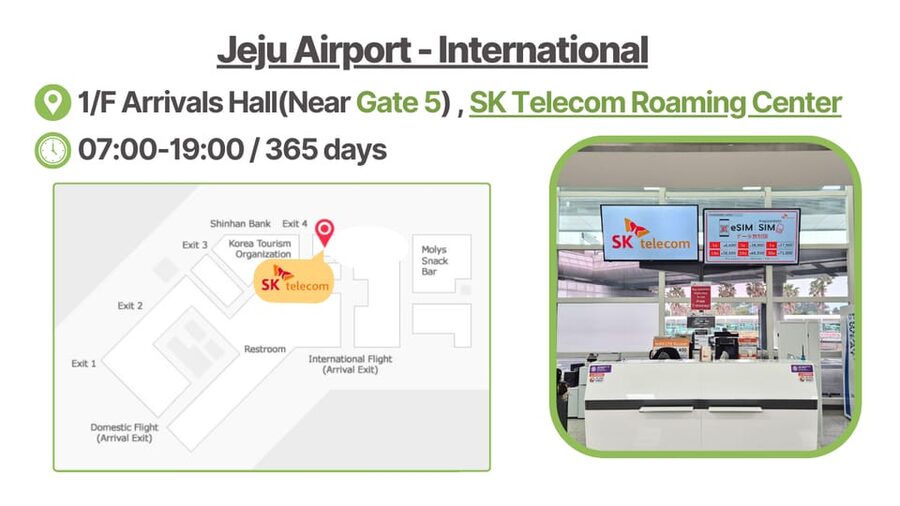
This is the part that can make or break your expectations.
Voice & SMS start after online verification
The product provides a Korean phone number for voice and SMS, but the ability to use those features depends on verification. The verification system uses your passport and is handled on a specific site (www.skroaming.com/passport).
Two key timing points are included:
- Verification can only be performed 1 hour after entry.
- Operating hours are 08:00–22:00 daily.
That means you might have data working immediately, but calling and texting can wait until the verification window opens.
Incoming calls and texts are included; outgoing is not
Included:
- Incoming calls and text messages without extra charges
Not included:
- Outgoing calls and outgoing SMS
So if you expect to place a lot of calls, this isn’t built for that. It’s more like: you can be reached and you can receive messages, and you can use your Korean number for situations where being reachable is more important than making outbound calls.
Voice credits are complimentary
There’s also a note about complimentary 1,320 KRW voice credits for domestic calls (the wording suggests a limited initial period, listed as until Drp 20). Practically, think of this as a small starter cushion, not a full allowance to replace a paid calling plan.
One number per passport
Only one phone number can be registered per passport. If you’re splitting the trip among multiple devices and buying multiple eSIMs, plan around that rule.
The Passport Verification Process: What You Need and How to Avoid Mistakes
Because voice/SMS rely on verification, you should treat this as a checklist item.
Bring:
- Your passport (the product explicitly says this is what to bring)
During verification, you’re instructed you may need:
- Your user ID (passport)
- Rental contract number
- The SIM/eSIM phone number
The contract number is referenced as being found either on what you receive at collection or in the voucher/eSIM content.
Also, there’s an important ordering rule:
- The eSIM can only be used for data services before being validated online.
- If you’re collecting multiple SIM/eSIMs, each needs to be validated online by each user for call activation.
So if you buy for a friend or a spouse, don’t assume one verification automatically activates everything. Follow the “each user validates” logic.
If Your Phone Says No: Compatibility and Unlocked-Phone Requirements
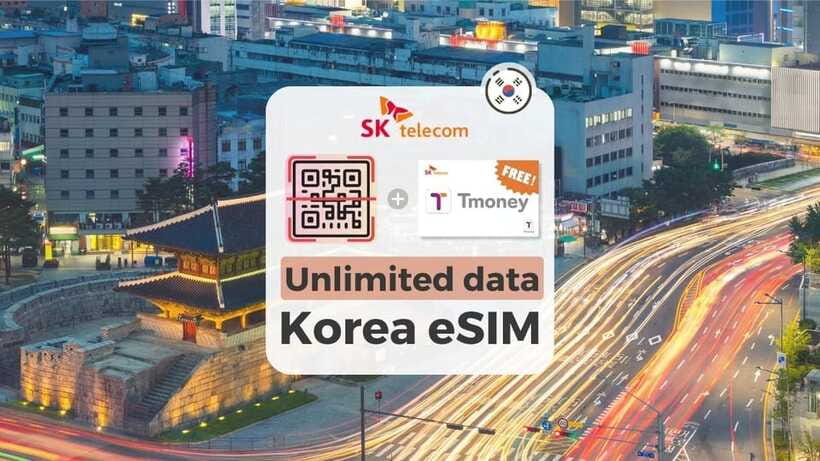
Two compatibility rules are mentioned, and both matter:
eSIM must be supported
Check for EID with #06#. If it isn’t there, this eSIM won’t work on that phone.
Your phone must be unlocked for a foreign SIM/eSIM
The guide says to make sure the phone is completely unlocked for a foreign SIM. It specifically calls out US, Canada, Japan, and the Philippines as places where you should double-check.
If your phone is carrier-locked, you may get data problems or setup failures. Fixing that on the fly is rarely fun.
Troubleshooting Fast: What to Do When Setup Feels Broken
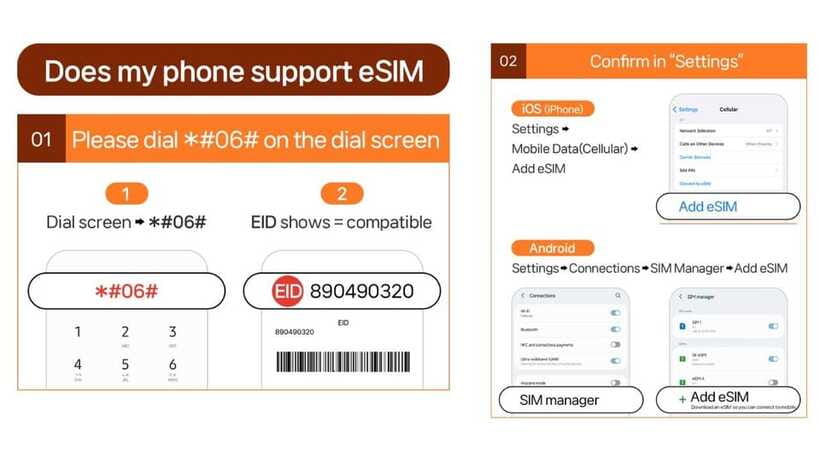
When something goes wrong, you don’t want to guess.
The product provides two core approaches:
- Check your settings for the newly added eSIM (iOS Cellular / Android SIM Manager)
- Contact the supplier if you keep getting QR or activation problems
Contact details are included for support:
- Email: [email protected]
- WhatsApp: https://wa.me/message/R7WRWPD6T67UM1
The negative experience in the feedback is a good reminder that setup can become stressful if you wait too long. If data disconnects, don’t panic—re-check whether the eSIM is still active in your SIM/eSIM manager and try again. If it keeps dropping, message support and include your situation clearly.
Value for $8: What You’re Really Paying For
$8 is a budget-friendly price point for Korea connectivity, but value depends on how you use it.
You get:
- Unlimited 4G LTE data (without speed throttling)
- An eSIM you can install on arrival
- Incoming calls/texts available after verification
- A Korean phone number (once verified)
You do not get:
- Outgoing call or outgoing SMS service included
- Roaming service (this is not a roaming add-on to your current plan; it’s a local eSIM setup)
So the value math is this:
- If you want reliable data all trip long and you mainly need texts/calls for receiving verification codes or staying reachable, this is strong value.
- If you expect heavy outgoing calling, you’ll likely need a different setup or you’ll rely on messaging apps more than phone calls.
Validity range options from 3 to 90 days also helps. If you’re doing a longer stay (but still within the tourist window), you may be paying the same low-ish entry cost for a longer coverage plan.
Who This eSIM Suits Best
This product makes the most sense if you:
- Want one dependable data connection from a major Korean provider
- Prefer managing everything on your phone via eSIM (no extra physical SIM)
- Need to be reachable by a Korean number at least after verification
- Are traveling within the allowed tourist duration (up to 90 days)
It’s less ideal if you:
- Need frequent outgoing phone calls and SMS
- Don’t have an eSIM-compatible phone
- Miss the verification window (voice/SMS won’t activate until you do the online passport verification)
Also note the eligibility rule: only foreigners with an overseas passport can buy. Korean passport holders can’t purchase. If you’re in a longer stay category (91 days or more), the product warns you might face service limitations or suspension without refunds.
Quick Checklist Before You Trust It
If you do just a few things, you’ll avoid most pain:
- Confirm EID exists on your phone (#06#)
- Make sure your phone is unlocked
- Find the real eSIM QR code email (not the voucher QR)
- Plan to install right after arrival so you start the clock
- Don’t wait for voice/SMS until the end of the trip—schedule verification within allowed hours
Should You Book This Unlimited Korea eSIM?
If your priority is simple: get unlimited data in South Korea and stay connected without juggling Wi‑Fi, then I’d say yes, this is a good fit for the price. The biggest reason is straightforward: unlimited, no-throttle data on SK Telecom with a hotspot option, all delivered as an eSIM.
I’d only hesitate if your trip depends on outgoing calling and texting, or if you know you’ll struggle with eSIM setup because your phone settings are confusing. In that case, you might want to build in extra time for installation, or choose a simpler backup plan.
In short: for most first-time visitors, this is the kind of practical buy that turns Korea from stressful to smooth. Just respect the small details—QR code source, eSIM compatibility, and the passport verification timing.
FAQ
How soon will I have data after arriving in South Korea?
After you install the eSIM and connect to SKT’s network in Korea, the plan starts based on hours. Data is the first service to work, and voice/SMS depend on later verification.
Is the QR code in my voucher the correct one for the eSIM?
No. The QR code in the GetYourGuide voucher is not the eSIM QR code. The eSIM QR code is delivered to your email separately about 1 day before the activity date.
What if I see an error like QR code is invalid?
Check whether a new eSIM appears in your device settings:
- iPhone: Settings > Cellular
- Android: Settings > Connections > SIM Manager
If it still doesn’t work, contact the supplier by email or WhatsApp.
Can I use voice calls and SMS immediately?
Voice and SMS require online verification using your passport. Verification can be performed 1 hour after entry and within the listed operating hours (08:00–22:00 daily). Data can work before validation.
Does the plan include outgoing calls and outgoing SMS?
The included services specify incoming calls and text messages. Outgoing calls and outgoing SMS are listed as not included.
Does the eSIM support hotspot sharing?
Yes. Hotspot sharing is supported.
What devices and passport types are eligible?
Your phone must support eSIM (EID should show after dialing *#06#). Also, only foreigners with an overseas passport are eligible; Korean passport holders cannot buy.
More Tour Reviews in Seoul
- Best DMZ Tour Korea from Seoul (Red Suspension Bridge Optional)★ 5.0 · 41,422 reviews
- DMZ Tour: 3rd Tunnel, Option(Suspension Bridge, Boat) from Seoul★ 5.0 · 21,373 reviews
- DMZ tour south Korea from Seoul (NK experience hall, defector)★ 5.0 · 20,599 reviews
- Seoul: DMZ Tour with Optional Suspension Bridge★ 4.8 · 5,277 reviews
- Seoul: DMZ The 3rd Tunnel and Suspension Bridge Tour★ 5.0 · 4,656 reviews
More Seoul Travel Essentials
- Incheon Airport: Traveler SIM & T-money Transportation Card★ 4.7 · 3,332 reviews
- Gimpo Airport: Traveler SIM and T-money Transportation Card★ 4.9 · 33 reviews
- South Korea eSIM (3-30 days. Up to 45GB)★ 5.0 · 5 reviews
Just added to Exploring Seoul






Travel Essentials (SIM & Passes), compared.
 ★ 4.7Incheon Airport: Traveler SIM & T-money Transportation CardFrom $123,332 reviews
 ★ 4.9Gimpo Airport: Traveler SIM and T-money Transportation CardFrom $1233 reviews
 ★ 4.5Korea SIM Card with SKT Unlimited Local Data & Voice CallsFrom $79 reviews
 ★ 5.0South Korea eSIM (3-30 days. Up to 45GB)From $55 reviews
Browse the lists this tour appears in