
Reviewed · TRAVEL ESSENTIALS (SIM & PASSES)
Gimpo Airport: Traveler SIM and T-money Transportation Card
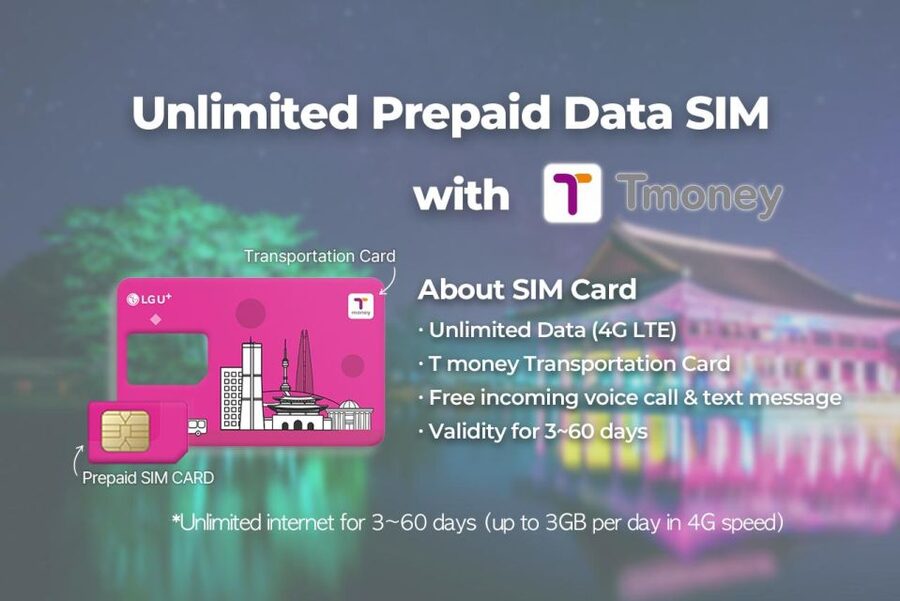
A SIM plus a transit card is the easiest start you can make. This one bundles unlimited 4G LTE with a T-money card, picked up at Gimpo Airport with staff support so you are not stuck fighting settings on arrival.
Two things I like right away are the in-person help at the counter and the practical combo: data for navigation and messages, plus a card for subways, buses, and more. One consideration: you do need to be ready on your side (your phone must be compatible, and you’ll want the T-money charged before you go).
The big win here is speed-to-use. A greeter (English or Korean) meets you at the airport counter, watches the activation step, and makes sure you are actually connected to data—so your maps and messaging work from minute one.
The second win is flexibility. You can choose a plan that runs from 3 days up to 2 months, and the SIM includes hotspot usage, plus incoming calls and text messages. The main drawback is the limits: outgoing calls/texts are not included, and there is no identity verification service.
If you are arriving at Gimpo and want less first-day stress, this bundle is a strong match. Just double-check phone compatibility first, especially for iPhone 14 models bought in the US.
In This Review
- Key highlights you’ll feel right away
- Why a Gimpo Airport SIM plus T-money makes your first day easier
- What happens at the Gimpo Airport counter (and why it matters)
- Your unlimited 4G LTE SIM: what you get and what to double-check
- How long does it last?
- Make sure your phone is ready
- The iPhone 14 US eSIM note
- T-money in real life: charge it, then use it everywhere you need
- What to expect when you start using it
- A note on purchases per passport
- The smartest way to use this pickup: confirm data, then test your first ride
- Unlimited internet for Korea moments you’ll actually care about
- Price and value: is $12 per person actually a good deal?
- Who should book this, and who should think twice
- Quick checklist before you head to Gimpo
- Should you book this Gimpo Airport SIM and T-money setup?
- FAQ
- Where do I pick up the SIM and T-money?
- Is the SIM data unlimited?
- Does the staff help activate the SIM?
- What is T-money used for?
- Do I need to charge the T-money card?
- Is outgoing calling and texting included?
Key highlights you’ll feel right away
- Greeter-assisted activation at Gimpo so your phone connects to data without guesswork
- Unlimited 4G LTE with hotspot usage for sharing connection with your group
- T-money card included for subway, bus, convenience stores, and card-accepting taxis
- Plan length from 3 days to 2 months so you can match your trip
- Incoming calls and texts included, outgoing not included to set expectations
Sort the practical stuff: more SIMs and city passes
- South Korea: Unlimited Data and Voice eSIM★ 4.6 · 156 reviews
- Gimpo Airport: Traveler SIM and T-money Transportation Card★ 4.9 · 33 reviews
- South Korea eSIM (3-30 days. Up to 45GB)★ 5.0 · 5 reviews
Why a Gimpo Airport SIM plus T-money makes your first day easier
Korea is simple once you have a little tech and transport solved. The hard part is the first hour: getting online, finding the right route, and paying for rides without hunting for machines or juggling cash. This experience tackles those exact pain points with one pickup at Gimpo Airport.
You get two tools that work together. The SIM keeps you on maps and messaging, while T-money handles the most common payments for transit and small purchases. When those two pieces click, your arrival stops feeling like a project.
The value is not only the items. It is the support. A greeter helps at the counter and makes sure your phone is connected to data. That means you can spend your energy on choosing where to go next, not on troubleshooting settings.
What happens at the Gimpo Airport counter (and why it matters)
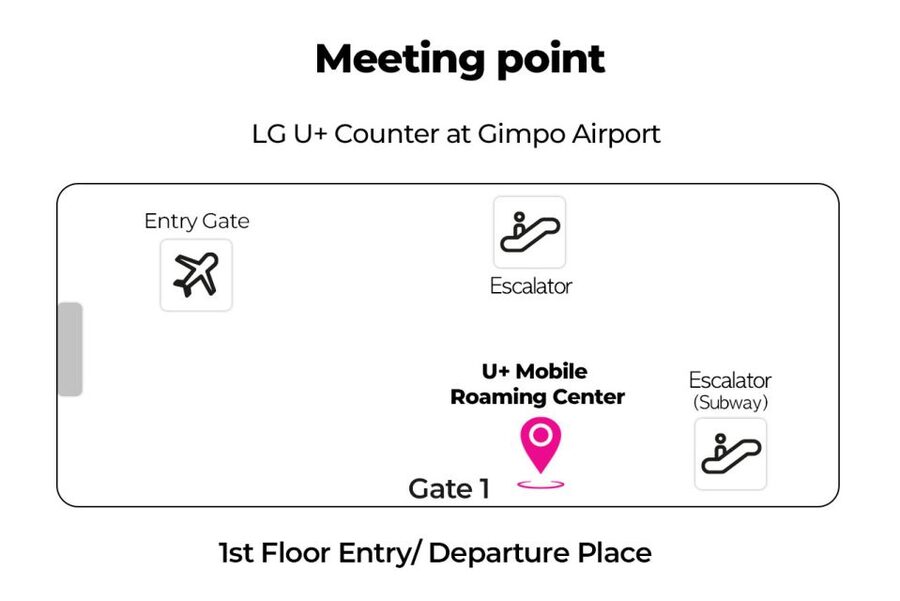
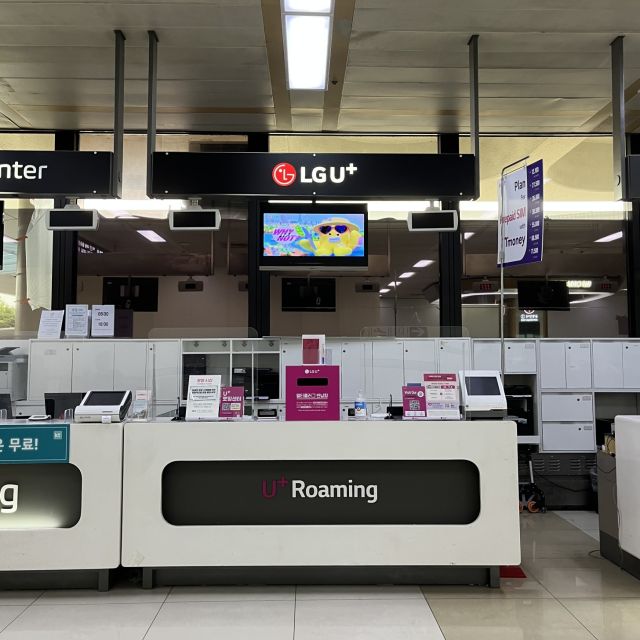
Your meeting point can vary depending on the option you book, but the practical reality is the same: you are picking up the SIM at a Gimpo Airport counter and getting help in person. The host/greeter is available in English and Korean.
Here is what that support looks like in the flow you’ll experience:
- You receive your data SIM and staff help you activate it
- The staff checks that your phone is connected to data
- You then receive your T-money card as well
Why this matters: on arrival days, your brain is tired. Language, airport signage, and your jet-lag brain do not mix well with phone settings. Having someone at the counter who can help you confirm data connection saves time and frustration.
It is also a relief if you are not sure which SIM size you need. The SIM comes in nano/micro/normal, so you should be able to match your phone model.
Your unlimited 4G LTE SIM: what you get and what to double-check
This SIM is built for continuous use. The data offer is unlimited 4G LTE, and you also get hotspot usage. That last part is huge for real trips, because it means you can share data with a second device or keep one person’s phone available while another device stays in navigation mode.
You also get practical communication coverage: incoming calls and text messages are included. Outgoing calls and texts are not included, so if you plan to dial home or message people without using apps, plan for that limit.
No identity verification service is included. In practice, that means you should not expect an ID-based verification help step as part of the package.




How long does it last?
You can choose a plan with duration options ranging from 3 days to 2 months. Availability and starting times can vary, so it’s worth picking the option that matches your actual arrival and departure dates.
Make sure your phone is ready
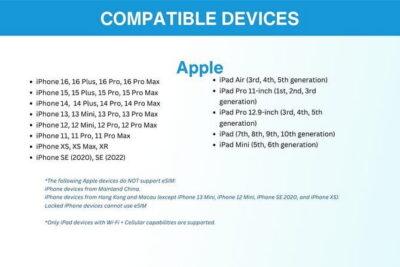
Before you go, check that your phone is compatible. The key requirement stated is that you should have your phone set so it works with the SIM from this service. If your phone is from the United States, Canada, Japan, or the Philippines, pay extra attention to this step.
The iPhone 14 US eSIM note
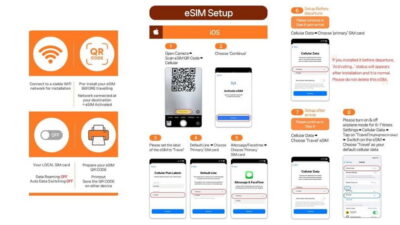
If you bought an iPhone 14 model in the US, it does not have a physical SIM tray and supports only eSIM. If you are in that situation, you’ll want to confirm your plan option is eSIM-compatible so you are not stuck on arrival day.
T-money in real life: charge it, then use it everywhere you need
The T-money card is a public transportation card you can use for subways and buses. It is also designed for everyday spending: you can use it at convenience stores, and it can be used for accredited taxis that accept cards.
There’s one catch that matters: the card needs to be charged. You are told to charge the card before using it.
What to expect when you start using it
Think of T-money as your on-the-go payment shortcut. Once it’s charged, you can tap through common travel moments:
- Transit rides (subway and bus)
- Quick stops at convenience stores
- Certain taxis where card payment is accepted
This is especially useful if you plan to hop between neighborhoods. You do not want to stop and think every time you see a station entrance.
A note on purchases per passport
There is also a limit: the maximum number of purchases per passport is 3. If you are traveling with multiple people and each person needs their own setup, plan accordingly and avoid assumptions.
The smartest way to use this pickup: confirm data, then test your first ride
You’ll get the chance to confirm your phone connection at the counter. Still, the best approach is to act like you are about to step into your trip. Right after activation, do a simple data check on your own, using an app you already know (maps, a browser, or a messaging app that uses data).
Then focus on the transport step. Since T-money needs charging, treat charging as your pre-departure task. Once the card is charged, you can tap into subway and bus rides and keep moving.
One small but practical tip: if you are relying on a second phone, consider using the hotspot feature if your setup allows it. That can keep navigation steady when one phone is busy photographing or coordinating.
Unlimited internet for Korea moments you’ll actually care about
The package is described as being useful for staying connected—photos, social media, and messaging are the obvious ones. But in daily terms, data helps with a few high-value trip tasks.
Here’s what data coverage lets you do while you wander:
- Check your favorite places on the map without guessing
- Stay in touch with friends and family
- Share travel photos and updates when you have a good moment
- Look up quick answers and practical info while you are on the move
- Handle work email if you need to stay on top of things
If you travel with someone else, hotspot can reduce stress. Instead of asking, Who has data? you can share a single connection and move as a team.
And because incoming calls and texts are included, you can still handle important messages even if you mainly use apps for outgoing contact.
Price and value: is $12 per person actually a good deal?
At $12 per person, this is not just buying a SIM. You are paying for a full setup that includes:
- An unlimited 4G LTE data SIM (with multiple SIM size options)
- A T-money card for transit and common purchases
- Hotspot usage
- Incoming calls and texts
- On-the-ground support at the Gimpo counter to help activation and confirm data connection
If you compare it to the alternative—figuring out SIM shopping after landing, then separately handling transport payment—this bundled approach can be worth it because it compresses time. Even if the individual items seem simple, the stress cost on arrival days is real.
This is best value for people who want a smooth start and do not want to spend their first morning in an electronics corner. If you already have everything solved (your phone is set, you have transport paid), then the bundle is still convenient, but the value is more about time saved than about the items alone.
Who should book this, and who should think twice
This experience fits best if:
- You land at Gimpo Airport and want the simplest arrival setup
- You want unlimited 4G LTE and hotspot for navigation and sharing
- You prefer in-person activation support instead of doing it yourself
- You plan to use public transport during your stay
You might think twice if:
- Your phone is not compatible with the SIM needs listed (especially if you have an iPhone 14 US model and require eSIM)
- You expect outgoing calls/texts to work like a traditional phone plan (outgoing is not included)
- You are counting on a service that does identity verification (there isn’t one here)
- You are traveling in a way that requires more than three purchases per passport
Also, if your itinerary includes lots of offline time and you are already confident with local payment apps, you may not feel the value as strongly. But if you want an easy first day, the combo is built for that.
Quick checklist before you head to Gimpo
Don’t leave these to chance. Use this short list to avoid arrival-day surprises:
- Confirm your phone is compatible with the SIM requirement (including that it is not tied to one carrier)
- If you have an iPhone 14 bought in the US, plan for eSIM-only support
- Bring the phone you will use during activation (and the one you’ll use for navigation)
- Charge/prepare your T-money card for use after you receive it
- If you’re booking for multiple people, remember the max three purchases per passport limit
Should you book this Gimpo Airport SIM and T-money setup?
Yes, I’d book it if you want a low-stress start: one pickup, one greeter-supported activation, and a transport card that helps you move right away. The big reason is practical—this bundle tackles the two things that usually slow people down after landing: getting online and paying for transit.
Skip it only if your phone setup is uncertain or if you know you will not need the included features. For most people arriving at Gimpo with a typical mix of transit, mapping, and messaging, this is a smart use of your time.
FAQ
Where do I pick up the SIM and T-money?
You pick up the SIM at a Gimpo Airport counter. The exact meeting point can vary depending on the option you book.
Is the SIM data unlimited?
Yes. The SIM includes unlimited 4G LTE data.
Does the staff help activate the SIM?
Yes. A greeter at the airport counter assists with activation and makes sure your phone is connected to data.
What is T-money used for?
T-money can be used on subways and buses, at convenience stores, and for accredited taxis that accept cards.
Do I need to charge the T-money card?
Yes. The T-money card needs to be charged before you use it.
Is outgoing calling and texting included?
No. The package includes incoming calls and text messages, but outgoing calls and text messages are not included. Also note there is no identity verification service.
More Tour Reviews in Seoul
- Best DMZ Tour Korea from Seoul (Red Suspension Bridge Optional)★ 5.0 · 41,422 reviews
- DMZ Tour: 3rd Tunnel, Option(Suspension Bridge, Boat) from Seoul★ 5.0 · 21,373 reviews
- DMZ tour south Korea from Seoul (NK experience hall, defector)★ 5.0 · 20,599 reviews
- Seoul: DMZ Tour with Optional Suspension Bridge★ 4.8 · 5,277 reviews
- Seoul: DMZ The 3rd Tunnel and Suspension Bridge Tour★ 5.0 · 4,656 reviews
More Seoul Travel Essentials
- Incheon Airport: Traveler SIM & T-money Transportation Card★ 4.7 · 3,332 reviews
- South Korea: Unlimited Data and Voice eSIM★ 4.6 · 156 reviews
- South Korea eSIM (3-30 days. Up to 45GB)★ 5.0 · 5 reviews
Just added to Exploring Seoul






Travel Essentials (SIM & Passes), compared.
 ★ 4.7Incheon Airport: Traveler SIM & T-money Transportation CardFrom $123,332 reviews
 ★ 4.6South Korea: Unlimited Data and Voice eSIMFrom $8156 reviews
 ★ 4.5Korea SIM Card with SKT Unlimited Local Data & Voice CallsFrom $79 reviews
 ★ 5.0South Korea eSIM (3-30 days. Up to 45GB)From $55 reviews
Browse the lists this tour appears in