
Reviewed · TRAVEL ESSENTIALS (SIM & PASSES)
South Korea eSIM (3-30 days. Up to 45GB)
No SIM line. Just phone data.
This South Korea eSIM keeps you connected from the first minutes after arrival, so you can message friends, look up directions, and stay online without hunting for a shop. You get a digital setup: order by email, scan a QR code, and activate the eSIM profile to get data quickly using local networks. It’s designed for Seoul and longer trips across the country.
What I like most is how practical the options are. You can choose a plan for 3 to 30 days, and you get plenty of high-speed data for trip planning and getting around. Another win is the way the connection is set up to use 4G/5G where available, so you’re not constantly fighting spotty service when you’re out walking.
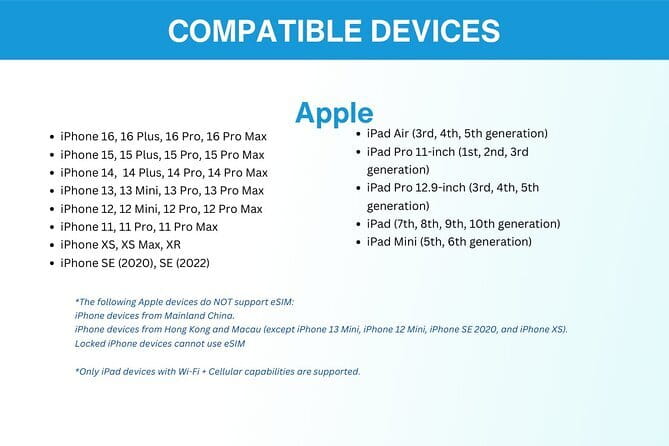
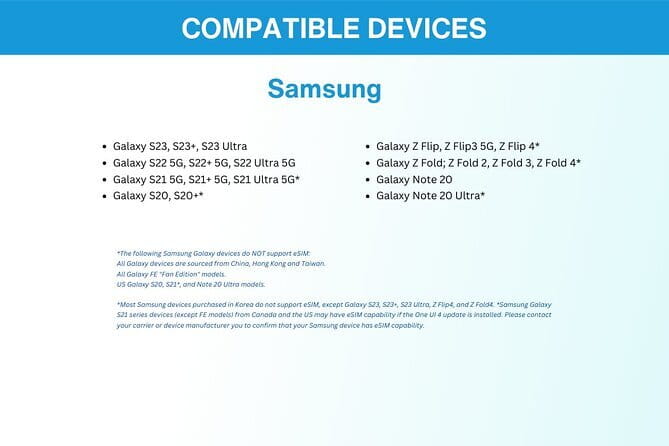
The main thing to watch is simple but important: your phone must support eSIM (for example iPhone XS and later, Pixel 3 and later, and Samsung S20/S21/Fold). If your phone isn’t compatible, the eSIM route won’t work, and you’ll need a different plan.
In This Review
- Key highlights to know before you buy
- What This South Korea eSIM Actually Does for Your Trip
- Price and Data Value: Is $5 Good Enough to Risk It?
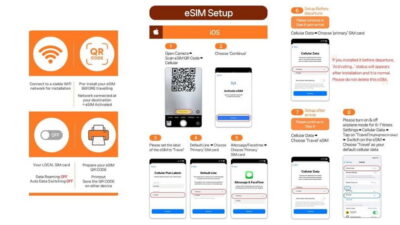
- Getting It Set Up: Email, QR Code, and the Real Activation Moment
- Speeds and Data Limits: 4G/5G, Then 3G
- Using It in Seoul (and Beyond): The Day-by-Day Reality
- Arrival day: make your phone useful fast
- Walking days: maps and messaging without friction
- Longer trips: the cap becomes your pacing tool
- Customer Support That Won’t Add More Stress
- Who This eSIM Fits Best (and Who Should Pause)
- Should You Book This South Korea eSIM?
- FAQ
- How do I get the eSIM?
- How fast will it work after I activate it?
- Does my phone need eSIM support?
- What network speeds does it include?
- Is there customer service help if something goes wrong?
- Can I cancel for a full refund?
Key highlights to know before you buy
- Email delivery + QR activation: you start with a digital setup and connect within minutes
- Choose your trip length (3–30 days): match the plan to your schedule instead of paying for time you won’t use
- 4G/5G where available: designed for local network performance across South Korea
- High-speed data cap then 3G: plan your usage so you don’t hit the slower stage too early
- Works well even beyond Seoul (reported): connection reliability is specifically praised for routes like Seoul to Jeju
- Remote support by email: if you’re unsure about eSIM compatibility, you can ask before you rely on it
Sort the practical stuff: more SIMs and city passes
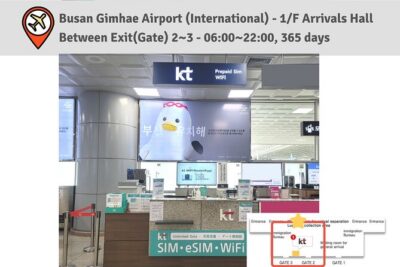
- Incheon Airport: Traveler SIM & T-money Transportation Card★ 4.7 · 3,332 reviews
- South Korea: Unlimited Data and Voice eSIM★ 4.6 · 156 reviews
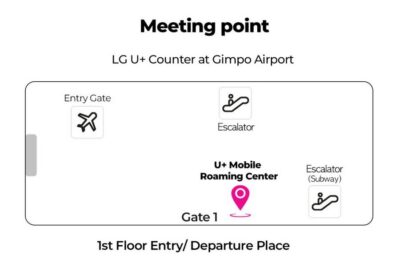
- Gimpo Airport: Traveler SIM and T-money Transportation Card★ 4.9 · 33 reviews
What This South Korea eSIM Actually Does for Your Trip
This isn’t a “tour” with stops. It’s a small piece of tech that quietly powers the whole trip. You’re buying mobile data access for South Korea, with the goal of making everyday travel stuff work smoothly: maps, translation searches, messaging, ride-hailing coordination, and quick calls.
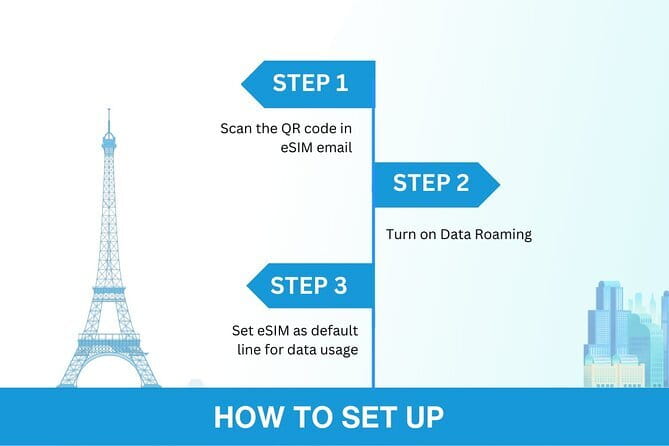
The promise is 4G/5G where available, connected to local rates. In plain terms, that means you’re not stuck paying international roaming style prices while you’re trying to navigate a new city. And because it’s an eSIM, you don’t bring a second physical SIM card into the mix.
A big practical detail: you select the duration from 3 to 30 days. That matters because the travel rhythm changes by length. On a short weekend trip, you mostly need navigation and messaging. On a 3-to-4-week trip, you’ll care more about video calls, streaming, and how quickly your data cap might disappear.
One more note that’s worth your attention: the description also says the data plan covers all Canadian provinces. That line doesn’t match the South Korea focus. Before you buy, double-check what countries the plan truly covers for your exact product, so you don’t get surprised by something on activation.
Price and Data Value: Is $5 Good Enough to Risk It?
At $5.00 per person, this is priced like a practical travel tool rather than a big-ticket upgrade. The value comes from two places:
First, it’s positioned as cheaper than buying a SIM at the airport. That makes sense because airport options often cost more and come with extra hassle. If you land and your phone is your lifeline, saving time can be worth as much as saving money.
Second, your plan includes a clear data structure: high-speed data for the amount you select, then a drop to 3G after you use the cap. That’s not “unlimited,” but it’s predictable. Predictability helps you plan. You can decide whether you’ll rely on streaming more heavily, or save bandwidth for directions and messaging.
The “up to 45GB” detail is the other value driver. For many travelers, 45GB over the course of a month is enough for maps, social media checks, navigation searches, and even a decent amount of video calling. If you’re the kind of traveler who streams constantly, you may still be fine, but you’ll want to watch how long it takes you to burn through high-speed data.
So is it a risk? Any prepaid data plan has trade-offs. The best way to reduce that risk is to match the duration and data limit to your actual usage, and to make sure your phone supports eSIM before you land.
Getting It Set Up: Email, QR Code, and the Real Activation Moment
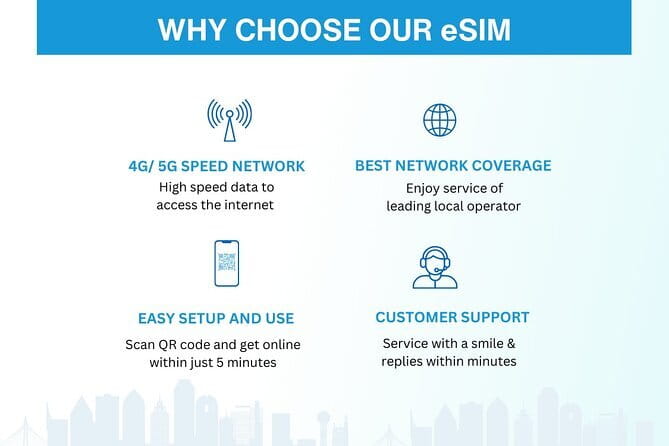
This eSIM is set up to work with a simple digital flow:
- You receive the eSIM by email
- You scan a QR code
- You activate the eSIM profile and get connected within minutes
That’s the ideal scenario. In real life, you may still need to tweak one or two settings. One practical tip from experience: after landing, you may need to turn on your data roaming so the data profile becomes active. Also, if it doesn’t seem to fully kick in, you might need to restart your device to complete activation.
None of this is complicated, but it’s the kind of thing that matters when you’re standing outside in Seoul trying to find your next stop. My suggestion: do the activation step before you go when possible, or at least before you rely on it for navigation. If you wait until you’re already in transit, you’ll have less patience for troubleshooting.
Also, you don’t have to meet anyone. It’s purely digital. That means no pickup window, no waiting for a person, and no “where are you” messages in a new time zone.
If you’re unsure whether your phone supports eSIM, you can contact the provider in advance. That’s worth doing if you’re on the edge of compatibility, especially with older models.




Speeds and Data Limits: 4G/5G, Then 3G

The big performance promise is 4G/5G where available. In cities like Seoul, that can make a huge difference for day-to-day use. Maps load faster. Messaging stays reliable. Video calls are more usable than on slower networks.
But you should plan around one constraint: data is capped. Once you use your included high-speed allowance, your speed switches to 3G. In day-to-day terms, that usually means browsing and messaging are still doable, but heavy streaming can turn frustrating.
Here’s a smart way to manage it without stress:
- Use high-speed data for the most demanding tasks early on (first-day navigation, downloading an offline map if you use it, and any high-quality video calls).
- After you’ve settled into your routine, shift your biggest bandwidth tasks to Wi-Fi whenever you’re near it (hotel, cafes, and so on).
One more comfort factor: the connection is described as automatically joining the best local network. That matters because you don’t want to babysit your signal while walking between neighborhoods.
Using It in Seoul (and Beyond): The Day-by-Day Reality

Even though this is a data product, you still experience it as a travel sequence. Here’s how your days usually feel when your phone is properly connected.
Arrival day: make your phone useful fast
On arrival, the fastest win is having data from the start. You can confirm addresses, translate signage, and get directions without switching to a backup device. The setup flow is designed for speed: email → QR scan → activate within minutes.
The practical checklist I’d follow:
- Confirm your eSIM profile is activated.
- Turn on data roaming if needed (this has come up in real-world activation).
- Restart your phone if it looks connected but nothing is loading.
Walking days: maps and messaging without friction
When you’re out exploring, the goal is simple: don’t waste time. You’ll use your phone for directions, transit lookups, and messaging friends and family so they know where you are. With data in place, you also have the freedom to change plans without losing your way.
Longer trips: the cap becomes your pacing tool
If you choose the maximum duration (up to 30 days), you’re not just buying connectivity. You’re buying peace of mind. Still, the high-speed cap and the switch to 3G means you should treat data like a resource, not an endless faucet.
A helpful mindset:
- If you plan lots of streaming or frequent uploads, you’ll burn high-speed faster.
- If your use is mostly navigation and communication, you’ll likely stretch the plan comfortably.
One review specifically praised reliable performance even on longer routes, including Seoul to Jeju, with strong signal. You should expect solid connectivity in common travel corridors, but you’ll still want to manage expectations about signal strength in rural or indoor spots.
Customer Support That Won’t Add More Stress
You don’t get a person on-site for this eSIM, but you do get remote customer service via email. That’s important because tech hiccups are never scheduled neatly around travel plans.
The support value here is mainly preventative:
- Ask before you buy if you’re unsure about eSIM compatibility.
- If activation feels stuck, email support for guidance rather than guessing for hours.
A small but meaningful detail: because the eSIM is delivered digitally, you’re not stuck waiting for physical pickup. Your “support moments” happen on your timeline, which is exactly how you want tech help to work while you’re exploring.
Who This eSIM Fits Best (and Who Should Pause)
This is a great fit if you:
- Have an eSIM-compatible phone (iPhone XS or later, Pixel 3 or later, Samsung S20/S21/Fold)
- Want to avoid airport SIM lines and language-related guesswork
- Plan to use your phone heavily for directions and staying in touch
- Want the flexibility of 3–30 day plan lengths
- Appreciate a simple setup process: email delivery and QR activation
You may want to pause or consider another option if:
- Your phone does not support eSIM
- You are uncomfortable with doing an activation step before you’re fully settled
- You need unlimited high-speed data and won’t adjust usage after the cap
It’s also smart to double-check the coverage note about Canadian provinces versus South Korea coverage, since the description includes that wording in a way that could confuse buyers.
Should You Book This South Korea eSIM?
I’d book this if your priority is easy, predictable connectivity and you already know your phone supports eSIM. The biggest reasons are the straightforward setup (email + QR) and the way it targets local 4G/5G so your maps and messaging work like you expect.
I wouldn’t book it blindly if you’re unsure about eSIM compatibility, or if you’re planning extreme data use where the switch to 3G would ruin your trip. In that case, the real decision isn’t the price. It’s matching the plan duration and data cap to how you actually use your phone.
If you’re the kind of traveler who hates last-minute errands after landing, this is the kind of small prep step that makes the rest of the trip feel calmer.
FAQ
How do I get the eSIM?
You’ll receive the eSIM by email. Then you scan the QR code to activate the eSIM profile.
How fast will it work after I activate it?
The setup is designed to connect within minutes after you activate the eSIM profile.
Does my phone need eSIM support?
Yes. Your phone must support eSIM. The product notes examples like iPhone XS and later, Pixel 3 and later, and Samsung S20/ S21/ Fold.
What network speeds does it include?
It supports 4G/5G where available. After you use the included high-speed data amount, speed switches to 3G.
Is there customer service help if something goes wrong?
Yes. The provider offers remote customer service by email.
Can I cancel for a full refund?
Yes, you can cancel for a full refund if you cancel up to 24 hours in advance of the experience’s start time. Canceling less than 24 hours before the start time won’t be refunded.
More Tour Reviews in Seoul
- Best DMZ Tour Korea from Seoul (Red Suspension Bridge Optional)★ 5.0 · 41,422 reviews
- DMZ Tour: 3rd Tunnel, Option(Suspension Bridge, Boat) from Seoul★ 5.0 · 21,373 reviews
- DMZ tour south Korea from Seoul (NK experience hall, defector)★ 5.0 · 20,599 reviews
- Seoul: DMZ Tour with Optional Suspension Bridge★ 4.8 · 5,277 reviews
- Seoul: DMZ The 3rd Tunnel and Suspension Bridge Tour★ 5.0 · 4,656 reviews
More Seoul Travel Essentials
- Incheon Airport: Traveler SIM & T-money Transportation Card★ 4.7 · 3,332 reviews
- South Korea: Unlimited Data and Voice eSIM★ 4.6 · 156 reviews
- Gimpo Airport: Traveler SIM and T-money Transportation Card★ 4.9 · 33 reviews
Just added to Exploring Seoul






Travel Essentials (SIM & Passes), compared.
 ★ 4.7Incheon Airport: Traveler SIM & T-money Transportation CardFrom $123,332 reviews
 ★ 4.6South Korea: Unlimited Data and Voice eSIMFrom $8156 reviews
 ★ 4.9Gimpo Airport: Traveler SIM and T-money Transportation CardFrom $1233 reviews
 ★ 4.5Korea SIM Card with SKT Unlimited Local Data & Voice CallsFrom $79 reviews
Browse the lists this tour appears in